Extracting a Recipe from YouTube with AWS Transcribe
A bash script that downloads audio from YouTube, uploads it to S3, runs an Amazon Transcribe job, and outputs a plain text transcript.
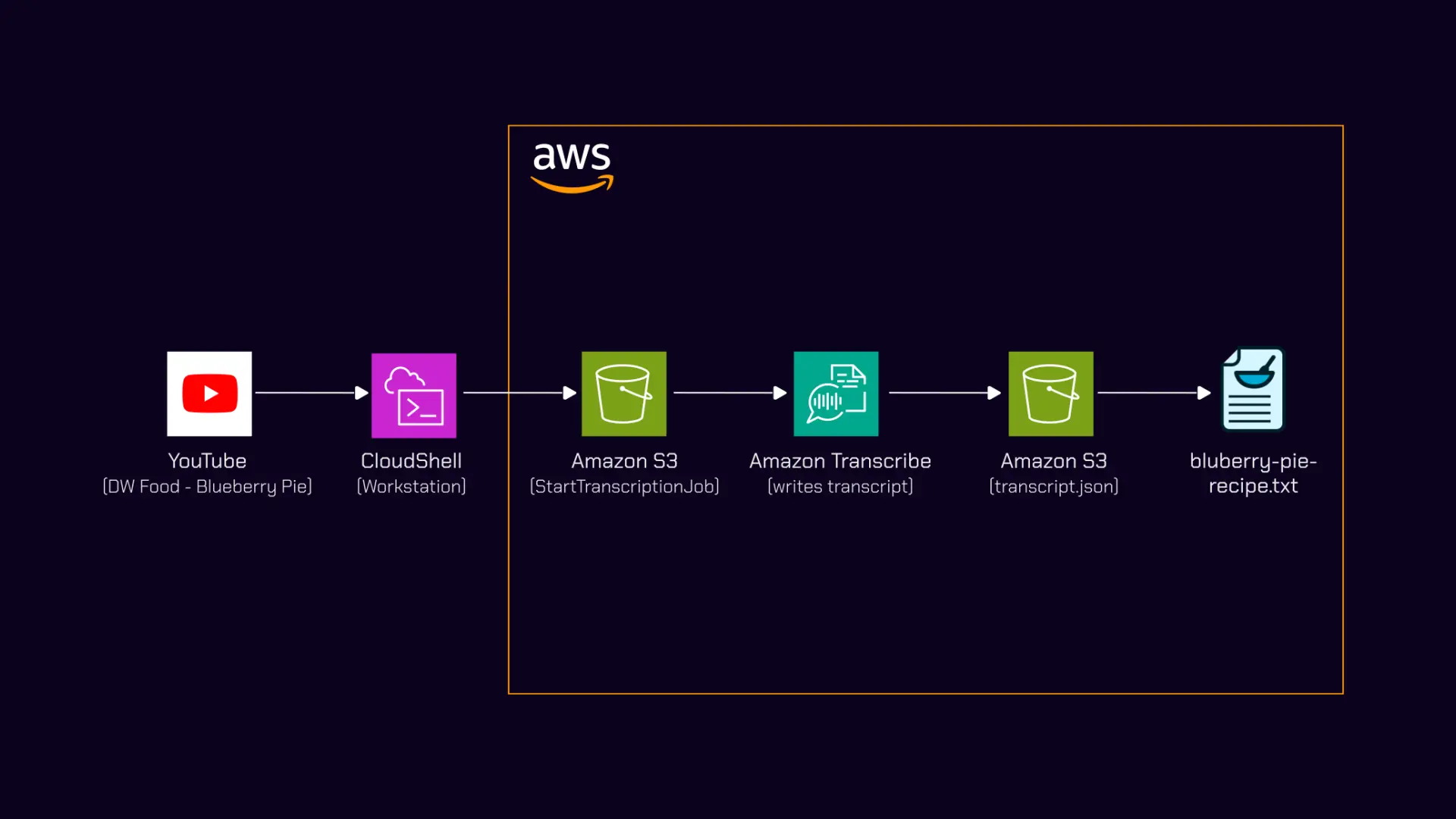
I watched a DW Food video about Finnish blueberries and wanted to extract a recipe mentioned midway through. The recipe was buried in 10 minutes of footage with no timestamp and no pinned comment. Rather than rewinding and writing it down, I built a bash script that pulls the audio, sends it through Amazon Transcribe, and outputs a clean text file. The recipe itself — a Finnish blueberry pie adapted for UK ingredients — is documented on notes.digitalden.cloud.
Why a Transcript
I am new to baking. Having the recipe as plain text meant I could paste it into AI and work with it properly — asking what each ingredient is, whether UK substitutes exist, converting to grams, and clarifying what each step actually does. That back and forth is hard to do with a video. With a transcript it is straightforward.
Pipeline Overview
graph LR
    A[YouTube Video] -->|yt-dlp| B[MP3 File]
    B -->|aws s3 cp| C[S3 Bucket]
    C -->|start-transcription-job| D[Amazon Transcribe]
    D -->|JSON output| C
    C -->|python3 extract| E[transcript.txt]
    E -->|paste into Claude| F[Refined Recipe]
| Step | Tool | Action |
|---|---|---|
| 1 | yt-dlp | Extract audio from YouTube as MP3 |
| 2 | AWS CLI | Upload MP3 to S3 |
| 3 | Amazon Transcribe | Start transcription job |
| 4 | AWS CLI | Poll for job completion |
| 5 | AWS CLI + Python | Download JSON, extract plain text |
Step 1: Extract Audio
1
yt-dlp -x --audio-format mp3 "https://www.youtube.com/watch?v=57HYrItZiKc"
This downloads the video, extracts the audio track, and converts it to MP3 in one command. Output: Why Finns are obsessed with blueberries.mp3.
What is yt-dlp
A command line tool for downloading video and audio from YouTube and most other video platforms. The-xflag extracts audio only and--audio-format mp3converts it directly, so you never download the full video file.
Step 2: The Transcribe Script
The bash script handles S3 upload, job creation, polling, and text extraction in a single run.
1
2
3
4
5
6
7
8
9
10
11
12
13
14
15
16
17
18
19
20
21
22
23
24
25
26
27
28
29
30
31
32
33
34
35
36
37
38
39
40
41
42
43
44
45
46
47
48
49
50
51
52
53
54
55
#!/bin/bash
BUCKET="your-bucket-name"
REGION="eu-west-1"

if [ -z "$1" ]; then
  echo "Usage: ./transcribe.sh <audio-file.mp3>"
  exit 1
fi

AUDIO_FILE="$1"
FILENAME=$(basename "$AUDIO_FILE" .mp3)
JOB_NAME="${FILENAME// /-}-$(date +%s)"
S3_KEY="transcribe-input/${FILENAME}.mp3"
OUTPUT_KEY="transcribe-output/${JOB_NAME}.json"
OUTPUT_TXT="${FILENAME}.txt"

echo "Uploading: $AUDIO_FILE"
aws s3 cp "$AUDIO_FILE" "s3://$BUCKET/$S3_KEY" --region "$REGION"

echo "Starting Transcribe job: $JOB_NAME"
aws transcribe start-transcription-job \
  --transcription-job-name "$JOB_NAME" \
  --media "MediaFileUri=s3://$BUCKET/$S3_KEY" \
  --media-format mp3 \
  --language-code en-US \
  --output-bucket-name "$BUCKET" \
  --output-key "$OUTPUT_KEY" \
  --region "$REGION"

echo "Polling for completion..."
while true; do
  STATUS=$(aws transcribe get-transcription-job \
    --transcription-job-name "$JOB_NAME" \
    --region "$REGION" \
    --query "TranscriptionJob.TranscriptionJobStatus" \
    --output text)

  echo "Status: $STATUS"
  [ "$STATUS" = "COMPLETED" ] && break
  [ "$STATUS" = "FAILED" ] && echo "Job failed." && exit 1
  sleep 15
done

echo "Downloading transcript..."
aws s3 cp "s3://$BUCKET/$OUTPUT_KEY" "/tmp/${JOB_NAME}.json" --region "$REGION"

echo "Extracting plain text to $OUTPUT_TXT"
python3 -c "
import json
with open('/tmp/${JOB_NAME}.json') as f:
    data = json.load(f)
print(data['results']['transcripts'][0]['transcript'])
" > "$OUTPUT_TXT"

echo "Done. $OUTPUT_TXT"
Usage
1
2
chmod +x transcribe.sh
./transcribe.sh "Why Finns are obsessed with blueberries.mp3"
Design Decisions
S3 output path
The script uses --output-bucket-name and --output-key to write the JSON directly to a known S3 path. Without these flags, Transcribe writes to a Transcribe-managed URI that requires an extra API call to resolve. This keeps the download step to one aws s3 cp with a predictable path.
1
2
--output-bucket-name "$BUCKET" \
--output-key "$OUTPUT_KEY"
Job name collisions
1
JOB_NAME="${FILENAME// /-}-$(date +%s)"
A Unix timestamp is appended so reruns of the same file never collide. Transcribe rejects duplicate job names.
Text extraction
1
data['results']['transcripts'][0]['transcript']
The Transcribe JSON output contains word-level timings, confidence scores, and speaker labels. For this use case none of that matters. I only need the full transcript as a single text block.
Polling interval
1
sleep 15
A 10-minute audio file typically completes in 2–3 minutes. Polling every 15 seconds keeps it responsive without excessive API calls.
Output Quality
The transcript came back clean:
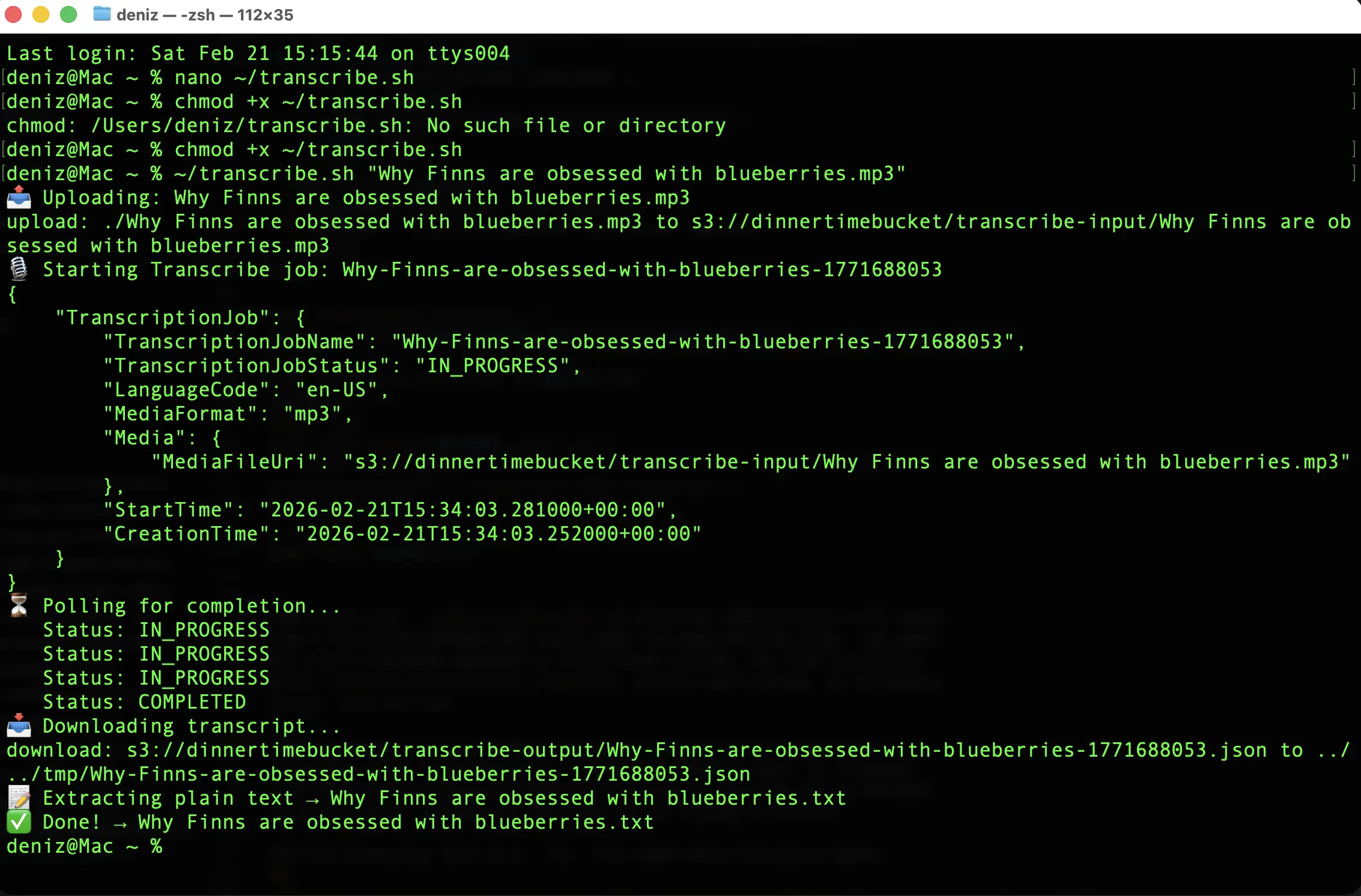
What worked
| Content | Result |
|---|---|
| English narration | Clean, accurate |
| Place names (Helsinki, Finland) | Correct |
| Cooking terms (rhubarb, blueberry, oats) | Correct |
| Numbers and measurements | Correct |
Where it struggled
| Content | Expected | Output |
|---|---|---|
| mustikka (Finnish for blueberry) | mustikka | Musica |
| Varpu (Finnish name) | Varpu | Varpoo |
This is expected. The job used en-US as the language code. The model is not trained on Finnish proper nouns. For a primarily English video with occasional Finnish words, the accuracy was more than enough to work with.
Language code selection
Amazon Transcribe supports Finnish (fi-FI). If the source audio were predominantly Finnish, switching the language code would improve accuracy on Finnish words but degrade English sections. For mixed-language content, the dominant language is usually the better choice.
S3 Bucket Structure
After a run, the bucket looks like this:
1
2
3
4
5
s3://your-bucket-name/
├── transcribe-input/
│   └── Why Finns are obsessed with blueberries.mp3
└── transcribe-output/
    └── Why-Finns-are-obsessed-with-blueberries-1740153600.json
Input and output are separated by prefix. The JSON filename includes the timestamp so multiple runs are easy to trace.
Cost
| Resource | Cost |
|---|---|
| Amazon Transcribe | ~$0.24 per 10 minutes of audio |
| S3 storage | Negligible for a single MP3 + JSON |
| S3 requests | Negligible |
For a one-off extraction this costs almost nothing.
What Comes Next
The CLI version works but requires a terminal and manual execution. The next step is making it event-driven.
graph LR
    A[MP3 → S3] --> B[Lambda: Start Transcribe]
    B --> C[EventBridge: Job Complete]
    C --> D[Lambda: Extract + Bedrock]
    D --> E[Markdown → S3]
| Component | Role |
|---|---|
| S3 event notification | Triggers on MP3 upload |
| Lambda (start) | Creates Transcribe job |
| EventBridge rule | Catches TranscribeJobStateChange with COMPLETED status |
| Lambda (process) | Downloads transcript, sends to Claude via Bedrock, formats output |
| S3 (output) | Stores final markdown file |
Drop an MP3 into S3 and a formatted markdown file appears. No polling, no terminal. Markdown is the output format because all my sites run on Jekyll with the Chirpy theme, so every post is a .md file with YAML front matter. A pipeline that outputs markdown means the transcript lands in a format I can publish directly. I will document that build when I get there.
For now the CLI version is enough. And the Finnish blueberry pie it extracted was 10/10.
Documented February 2026.