Vertex AI Search vs RAG Engine: Grounding Gemini with My Own Data
Comparing three grounding methods on Google Cloud using my own blog posts. Vertex AI Search, RAG Engine, and Google Search grounding. What worked, what broke, and what surprised me.
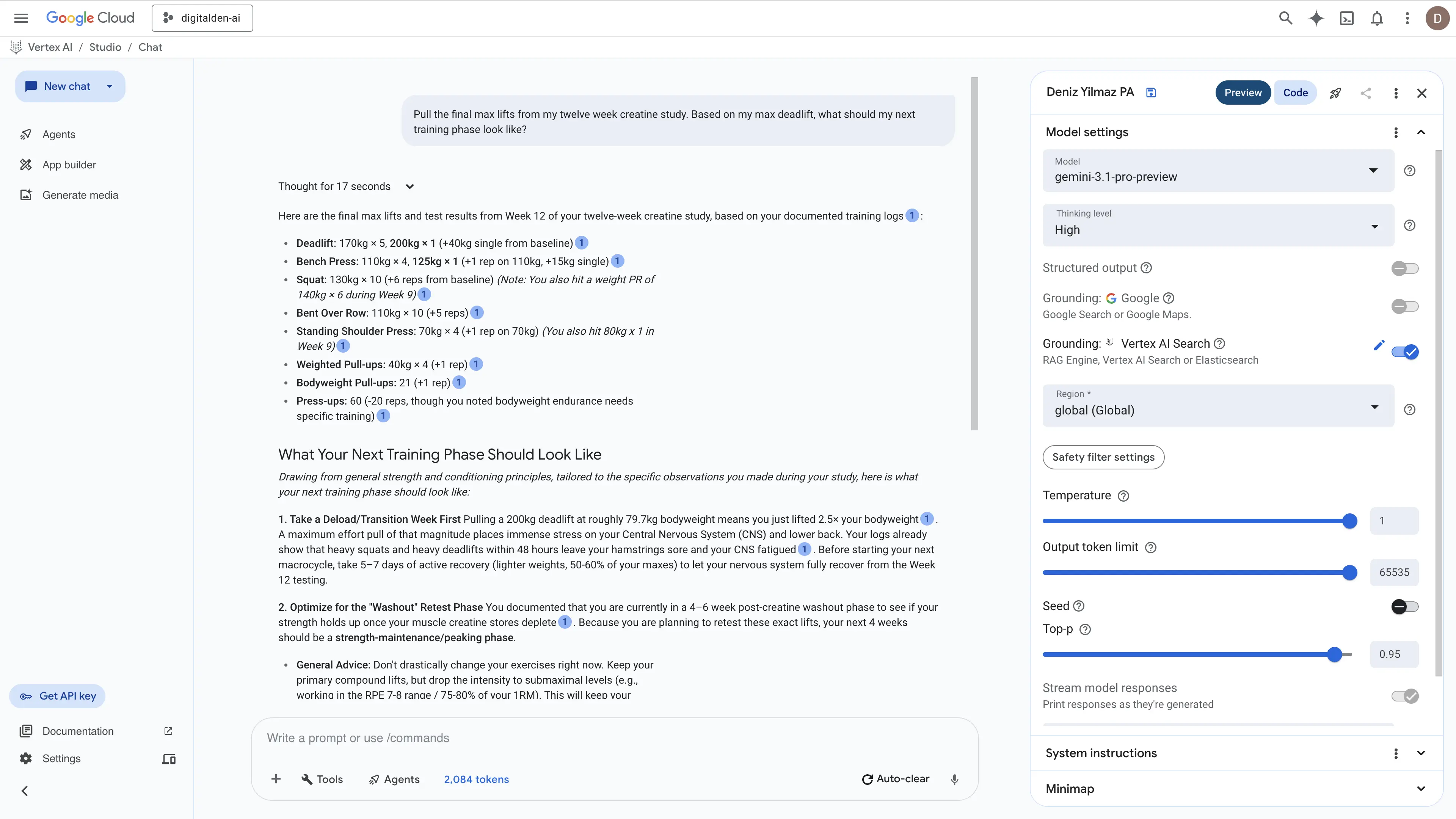
I write a lot. I have blog posts about training, photography, travel, tech builds, recipes, and personal reflections. All of it lives on one of my Jekyll Chirpy sites. I wanted to ground a language model against my own writing so I could ask questions about my life and get answers pulled directly from my posts. For example, I wanted to ask what my strongest lifts were in the creatine study and have it pull the actual numbers. I also wanted to ask what lens I should get next, and have it already know I was looking at the Sigma 18-50mm for low light gym filming based on my gear post. Then I wanted to follow up and ask what it actually thought of that choice. I wanted the model to use its general knowledge about photography to give me real advice, but I needed it grounded entirely in my personal context. I basically wanted my raw data as the foundation and the AI’s own knowledge filling in the gaps on top. That is exactly why I built it.
A follow-up post will cover the AWS equivalent using Amazon Bedrock Knowledge Bases.
Why I Did This
I had already built a Bedrock agent on digitalden.cloud that searches the AWS News Blog RSS feed and answers questions about recent announcements. That agent works well for live data retrieval, but it is limited. It knows a little about me from the two or three paragraphs I wrote on my homepage, but it does not have a knowledge base grounded in my actual content. It searches a feed, returns results, and formats them. There is no RAG.
RAG (Retrieval-Augmented Generation)
A technique where a model retrieves relevant information from an external data source before generating a response. Instead of relying only on its training data, the model searches your documents, finds the most relevant sections, and uses them as context when answering. This grounds the response in your actual data and reduces hallucination.
If I only had one post, I would not need RAG. I could paste the whole thing into a chat window and ask questions directly. The model sees the entire document and nothing is lost. RAG works differently. It splits documents into chunks, converts them into embeddings, and retrieves only the chunks that semantically match your question. For one document that is worse. For 28 documents, or 280, it is the only practical option. You cannot paste everything into every conversation, and even if you could, you would be paying for all those input tokens on every single query. RAG indexes all your documents once and retrieves only the relevant sections at query time.
After six months of writing personal posts, I had enough data to work with. 28 blog posts covering everything from a 12-week creatine study to building a serverless film portfolio on AWS. The next step was building the actual RAG layer. Feed my posts into a system, ground a model against them, and build something I can actually query about my own life.
I was already creating lessons on Vertex AI Search for work on Google Cloud, so it made sense to take it a step further and build something for myself. Google Cloud offers multiple ways to ground a model against your own data. I tried all of them.
The Three Methods
Google Cloud offers three ways to ground a model against your own data. I tested all three using the same 28 blog posts.
Vertex AI Searchis the fully managed option. You point it at a website or document source, and it handles crawling, indexing, chunking, and retrieval automatically. You do not control any of those steps.Vertex AI RAG Engineis the manual option. You upload your own documents, choose your embedding model, configure chunking, and select a vector database. You control the full pipeline.Google Search Groundingis not a RAG system. It grounds the model using live Google Search results. I did not plan to test this one. It happened by accident, and it turned out to be relevant.
I tested all three by grounding Gemini in Vertex AI Studio and asking the same questions across each method. Later in the post I compare real responses side by side. This post documents all three in the order I built them.
Starting Fresh
I had used Google Cloud before for course content, but the projects were messy. Old data stores, wrong billing setup, and a free trial that blocked certain APIs. I deleted everything and started from scratch.
The New Project
I created a single project called digitalden-ai with a clean, readable project ID. I selected denizyilmaz-org as the organisation, which Google auto-created when I first signed up with my personal Google account. I linked my existing billing account, the one I had already upgraded from free trial to a paid account after discovering that the free trial blocks the Discovery Engine API.
That billing issue cost me hours during my first attempt. The error said BILLING_DISABLED even though billing appeared linked in the console. The root cause was the free trial itself. Certain APIs, including the one that powers Vertex AI Search grounding, refuse to work on free trial billing accounts regardless of how they appear in the UI. The fix was clicking “Activate” to upgrade to a full pay-as-you-go account. The remaining free credit carried over.
Lesson learned
If you hit aBILLING_DISABLEDerror on Google Cloud and billing looks linked, check whether your account is still on the free trial. Upgrading to a paid account does not charge you immediately. Your existing credit carries over.
Vertex AI Search: The Managed Approach
Vertex AI Search is Google’s fully managed search and retrieval product. You point it at a data source, it crawls, indexes, chunks, and embeds everything automatically. You do not control any of those steps.
Creating the Data Store
I navigated to AI Applications in the Google Cloud Console, selected Site Search with AI mode, and created a new app with Enterprise edition and Generative responses enabled. I named the app digitalden-search.
For the data store, I selected Website content as the source, enabled Advanced website indexing (required for summarisation and follow-ups), and entered my site URL.
1
denizyilmaz.cloud/*
I added exclude patterns for pages that are auto-generated navigation rather than actual content.
1
2
3
denizyilmaz.cloud/tags/*
denizyilmaz.cloud/categories/*
denizyilmaz.cloud/archives/*
I also added my sitemap URL so Vertex AI Search knew exactly where all the posts lived rather than relying solely on crawl discovery.
Sitemap
An XML file that lists every page on your site with metadata like the last modified date. Crawlers use it to discover pages without having to follow every link on the site. Mine is athttps://denizyilmaz.cloud/sitemap.xml. Jekyll Chirpy generates it automatically on every build.
Domain Verification
Because Advanced website indexing was enabled, Vertex AI Search required domain verification. This is a security control that ensures only the site owner can enable deep crawling over their content.
Verification happens through Google Search Console. You add your domain as a property, and Google gives you a TXT record value. You then create that TXT record in your DNS provider. My domain is managed through Amazon Route 53, so I added the TXT record there on the root domain. Root domain verification covers all subdomains underneath it, so a single record for denizyilmaz.cloud also covers any subdomains.
After adding the record, Google Search Console shows “Processing data, please check again in a day or so.” Once verification completes, you go back to the data store page in the Google Cloud Console and refresh. The verification warning clears and initial indexing begins.
My domain was already verified from a previous project, so this step cleared automatically.
Waiting for Indexing
Indexing took approximately 24 hours. The data store UI showed “Initial index in progress” with a document count of zero for most of that time. There was no progress indicator, no estimated completion time, and no way to tell whether it was working or stuck.
After 24 hours, the document count updated to 32. That covered all of my blog posts plus a handful of site pages like the homepage and gallery. The data store size was 15.63 MiB.
| Detail | Value |
|---|---|
| Data store ID | denizyilmaz-docs_1775886563827 |
| Type | Website (Advanced) |
| Region | Global |
| Documents indexed | 32 |
| Time to index | ~24 hours |
| Automatic refresh | Enabled |
Testing Vertex AI Search Grounding
In Vertex AI Studio, I opened a new chat, enabled grounding, selected Vertex AI Search as the source, and entered the data store path.
1
projects/digitalden-ai/locations/global/collections/default_collection/dataStores/denizyilmaz-docs_1775886563827
I asked “How does the YouTube recipe extractor work?”
The response pulled the exact backstory from my notes about watching a DW Food video on Finnish blueberries. It explained how I used AWS Transcribe to rip the audio so I could adapt the recipe for UK ingredients like crème fraîche and bake a pie that I rated ten out of ten. Then it broke down the serverless architecture using S3 and Lambda. It actually went a step further and used its general knowledge to infer that I probably used Amazon Bedrock to format the final text.
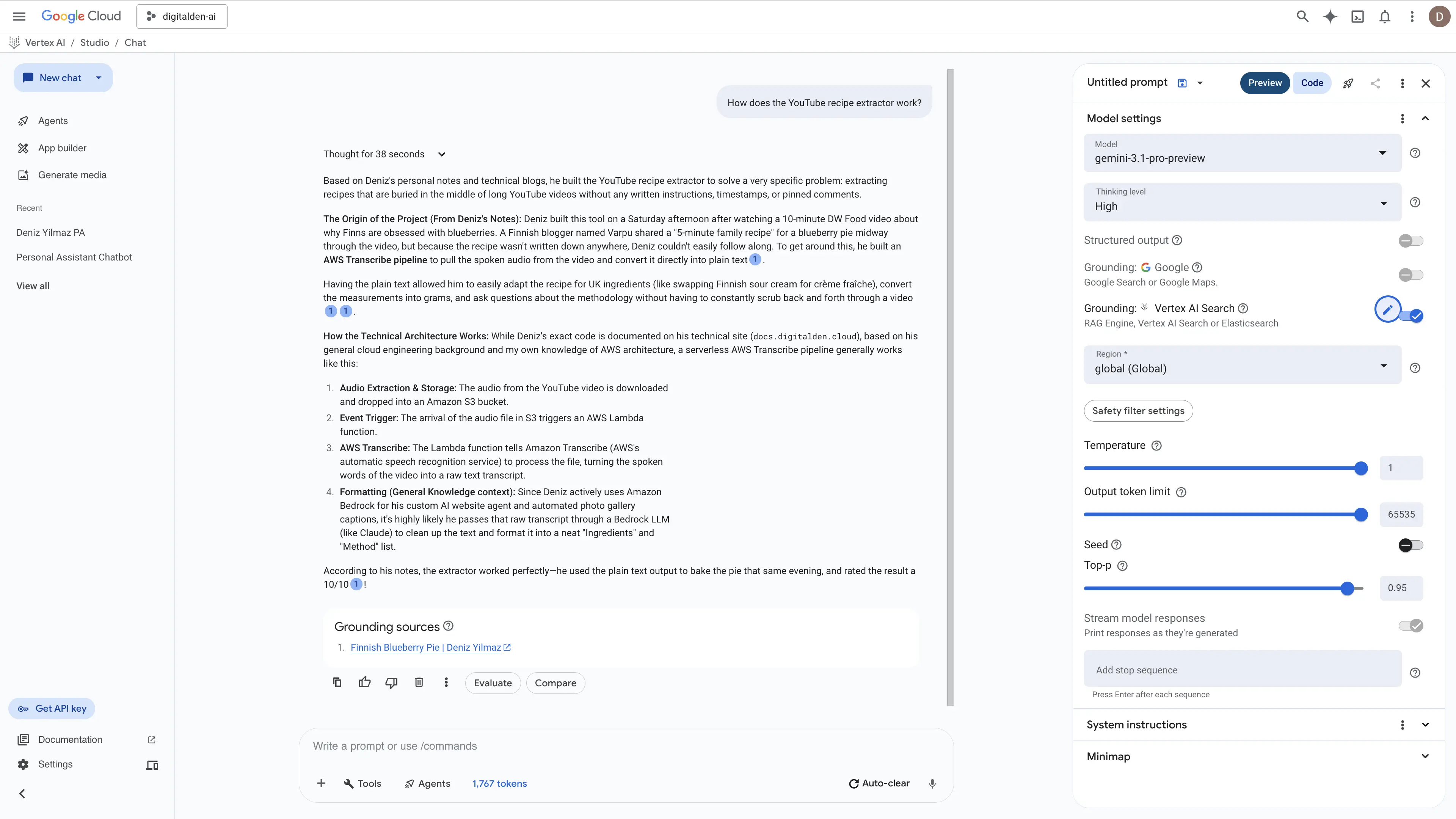
Vertex AI Search handled the synthesis perfectly. It stitched my personal baking logs together with my technical cloud engineering docs and cited the sources correctly.
The Black Box Problem
Vertex AI Search worked, but I had no visibility into how it worked. I could not see how it chunked my pages, which embedding model it used, or how it ranked the results. When I published new posts, I had no way to trigger an immediate re-crawl from the console UI. Automatic refresh was enabled, but Google does not tell you the crawl frequency. It could be daily, weekly, or longer.
Two new posts I published did appear in the data store roughly 12 hours later, bringing the count from 32 to 34. The timing was unpredictable.
RAG Engine: The Manual Approach
Vertex AI RAG Engine is Google’s more hands-on option. You create a corpus, upload your own documents, configure chunking and embedding, and control the retrieval pipeline. It sits at a different level of abstraction than Vertex AI Search.
Corpus
What Google calls the index that holds your documents. Think of it as a container for your knowledge base. You create a corpus, import files into it, and the system chunks, embeds, and stores them for retrieval. The AWS equivalent is a Knowledge Base in Amazon Bedrock.
Uploading to Cloud Storage
RAG Engine imports documents from Google Cloud Storage, Google Drive, or local files. I chose Cloud Storage because it mirrors how you would use S3 with Bedrock Knowledge Bases on AWS, and because it supports automation through gsutil rsync for future updates.
I created a GCS bucket called digitalden-ai-posts in europe-west2 (London), then cloned my blog’s GitHub repo in Cloud Shell and copied all 28 markdown files into the bucket.
1
2
git clone https://github.com/DigitalDenCloud/denizyilmaz.cloud.git
gsutil cp denizyilmaz.cloud/_posts/*.md gs://digitalden-ai-posts/
Google recommended using gcloud storage instead of gsutil in the output. That is a CLI migration happening on the Google Cloud side. The AWS equivalent is aws s3 cp for single copies or aws s3 sync for incremental updates.
All 28 files uploaded in seconds. Total size was 722 KiB.
Choosing a Deployment Mode
RAG Engine offers two deployment modes for the underlying vector database.
- Serverless
- Uses Managed Vertex AI Vector Search 2.0, a preview feature with no additional infrastructure cost. Best for experimentation and getting started.
- Spanner
- Provisions a dedicated Cloud Spanner instance with a choice of Basic or Scaled tier. Both have ongoing hourly charges. Best for stable, production workloads.
I started with Serverless because it was free.
Creating the Corpus
Serverless mode was only available in us-central1. I configured it using the API.
1
2
3
4
5
curl -X PATCH \
  -H "Content-Type: application/json" \
  -H "Authorization: Bearer $(gcloud auth print-access-token)" \
  -d '{"ragManagedDbConfig": {"serverless": {}}}' \
  https://us-central1-aiplatform.googleapis.com/v1beta1/projects/digitalden-ai/locations/us-central1/ragEngineConfig
I then created the corpus through the console with the following settings.
| Setting | Value |
|---|---|
| Corpus name | denizyilmaz-blog |
| Data source | gs://digitalden-ai-posts/ |
| Chunking size | 1,024 tokens |
| Chunk overlap | 256 tokens |
| Parser | Default parsing libraries |
| Embedding model | text-embedding-005 |
| Vector database | Managed Vertex AI Vector Search 2.0 |
Why 1,024 tokens?
That is Google’s recommended default. A 1,024 token chunk is roughly 750-800 words. For blog posts with clear heading structure, a better strategy would be chunking on headings so each chunk contains a complete section about one topic. The Layout Parser option in the console was designed for this, but it failed to initialise in my project. Fixed-size chunking with the default parser worked, but it splits content based on token count rather than document structure. Some chunks end up containing parts of two different sections, which weakens the semantic match during retrieval.
The Vector Search API needed enabling first. After that, all 28 files imported in under 10 seconds. Compare that to 24 hours for Vertex AI Search to crawl and index 32 pages from the live website. The speed difference between uploading files directly and waiting for a web crawler is significant.
I configured grounding in Vertex AI Studio, pointed it at the RAG Engine corpus, and asked “What is DenMotion?”
It worked. The answer was shorter than Vertex AI Search’s response, but it correctly identified the three relevant posts and cited them as grounding sources from the GCS bucket paths.
Then the errors started.
The QPS Problem
Every second or third query returned this error.
1
2
Failed to process Rag Managed Vertex Vector Search response.
QPS or BW/in or BW/out quota exceeded
The Vector Search backend was rejecting requests with a rate limit error. I checked the Quotas page in the console. The collection read requests quota for us-central1 was set to 300 requests per minute, and my usage was at 0%. The quota was not the issue.
I waited 12 hours and tried again. Same error. This was not a provisioning delay. The Serverless preview was genuinely unstable for my use case.
Switching to Spanner Basic
I decided to switch from Serverless to Spanner Basic tier for a stable backend. Spanner Basic provisions 100 processing units (0.1 nodes) and charges approximately £0.70-0.90 per hour while running.
Switching to Spanner mode in us-central1 failed with a different error. New projects in us-central1, us-east1, and us-east4 require an allowlist for Spanner mode.
I switched to europe-west2 (London) instead. Spanner Basic provisioned successfully. I created a new corpus with the same settings, imported the 28 files from the GCS bucket, and tested.
Every query worked. No QPS errors. No intermittent failures. The answers were consistent and grounded in the correct source files.
| Question | Sources Retrieved | Worked |
|---|---|---|
| What is DenMotion? | 3 posts | Yes |
| What camera does Deniz use? | 2 posts | Yes |
| What did Deniz do in Bodrum? | 1 post | Yes |
| What recipes has Deniz made? | 2 posts | Yes |
| What has Deniz written about recently? | 1 post | Yes |
| What camera lens should he get next? | 2 posts | Yes |
Spanner Basic was stable, but it cost money and the answers were restricted to the corpus. When I asked a general knowledge follow-up question after a grounded query, the model answered only from what was in my blog posts rather than providing a broader explanation. With grounding enabled, the model refused to use its own knowledge.
Reranking
RAG Engine offers a reranking step that uses a language model to re-sort retrieved chunks by relevance before generation. Reranking should improve answer quality, especially for vague queries where the initial embedding match might miss relevant content.
Every reranking configuration I tried failed. gemini-3.1-pro-preview returned “Publisher Model was not found.” gemini-2.5-pro returned the same error. gemini-2.5-flash worked for simple single-post queries, but returned quota exhausted errors on any query that required retrieving from multiple posts. I tested this across both Serverless and Spanner deployment modes over multiple days. The result was the same.
I left reranking disabled. Without it, RAG Engine still returned grounded answers, but the retrieval quality for vague or broad queries was noticeably weaker than Vertex AI Search.
The Accidental Discovery
While testing different configurations, I forgot to turn on RAG Engine grounding and accidentally left Google Search grounding enabled instead. I asked the same questions and got detailed answers that combined my personal blog content with general knowledge.
Google Search grounding works differently. Instead of searching a private corpus, it searches the public web using Google Search. Because my blog posts are publicly indexed by Google, it found them through normal web search and grounded its responses in the live pages.
The quality was impressive, but there were problems. With system instructions telling it to prioritise my data, it triggered a research-style workflow that took over three minutes per response. Without system instructions, it responded quickly but grounded on random web results instead of my posts.
Google Search grounding is powerful, but it is not a replacement for a dedicated data store when you need consistent retrieval from your own content.
Vertex AI Search with System Instructions
The accidental discovery led me back to Vertex AI Search grounding, but with better configuration.
I set up Vertex AI Studio with Gemini 3.1 Pro Preview, pointed the grounding at my Vertex AI Search data store, and added system instructions.
You are a personal assistant for Deniz Yilmaz. Use the retrieved documents as your primary source of information about Deniz’s life, projects, training, health, and experiences. When the user asks follow-up questions that go beyond what is in the documents, use your general knowledge to provide helpful advice, context, and information. Always make it clear when you are drawing from the documents versus your own knowledge.
This configuration produced the richest answers of any method I tested.
When I asked “What camera does Deniz use and what are its strengths for gym filming?”, it pulled the Sony A6700 and 18-135mm lens from my posts, referenced my HYROX and low-light gym filming content, and then used general knowledge to explain why the A6700 works well for fitness shooting. It covered the BSI sensor, AI autofocus, 4K at 120fps, in-body stabilisation, and the compact form factor.
When I asked about camera lenses, it pulled my preferences from the posts and then gave detailed recommendations based on general photography knowledge, including why a Sigma 18-50mm f/2.8 would improve low-light gym filming and how it would complement my existing kit.
When I asked it to summarise me, it produced a profile that synthesised information from across all my posts, covering my career pivot, my AWS certifications, DenMotion, training habits, travel, and diet.
Vertex AI Search with Gemini 3.1 Pro Preview and system instructions was the clear winner for my use case.
Comparing Real Responses
The same questions produced very different answers depending on the grounding method. Here are two examples that show the gap.
“What is DenMotion?”
RAG Engine (Spanner Basic, no reranking)
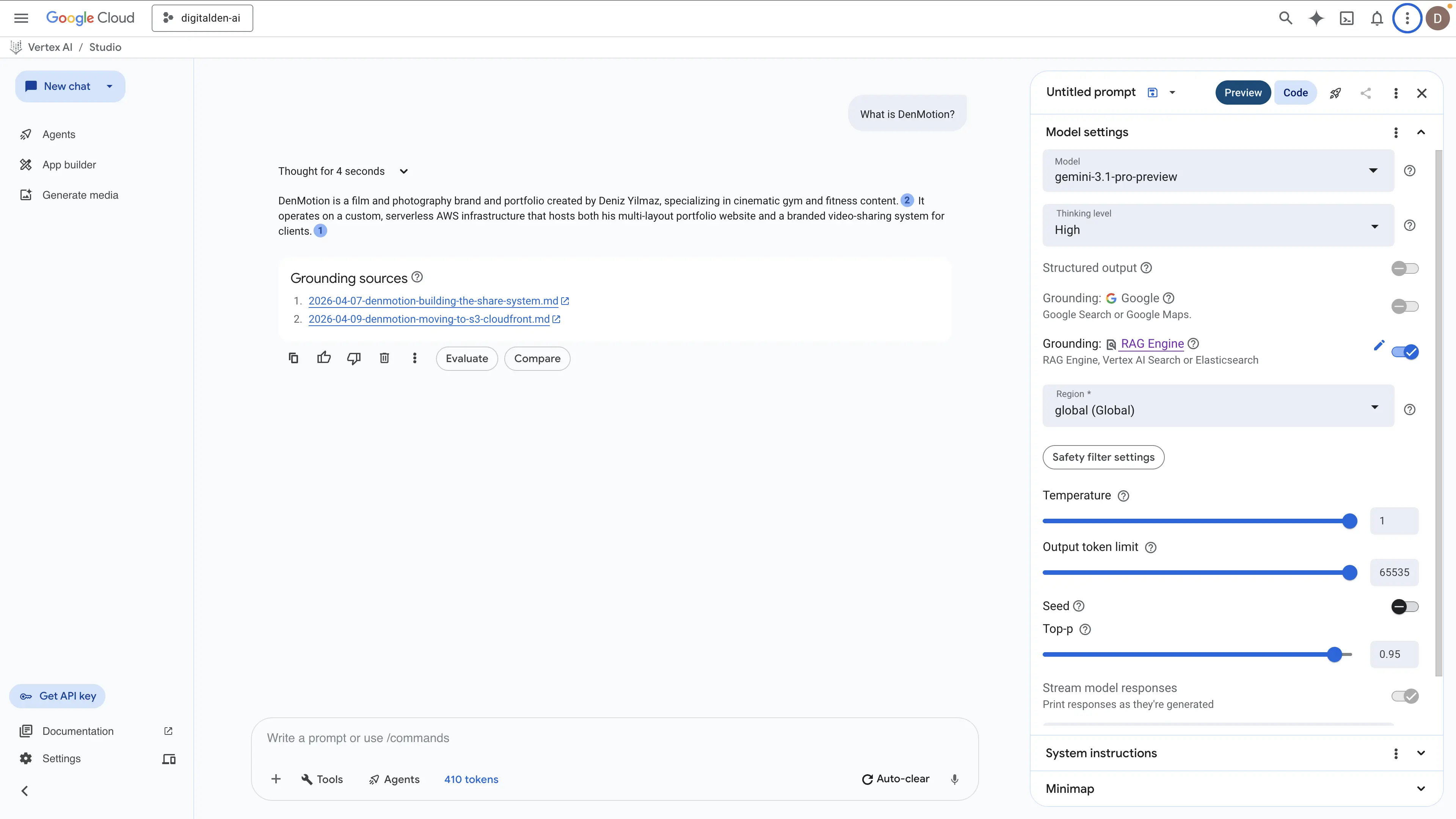
The response generated two sentences from two sources. It successfully identified the brand along with the infrastructure and the client delivery system. However, it missed the deeper context regarding the naming process, the reasoning behind the niche decision, and the underlying architecture details.
Vertex AI Search (Gemini 3.1 Pro Preview, system instructions)
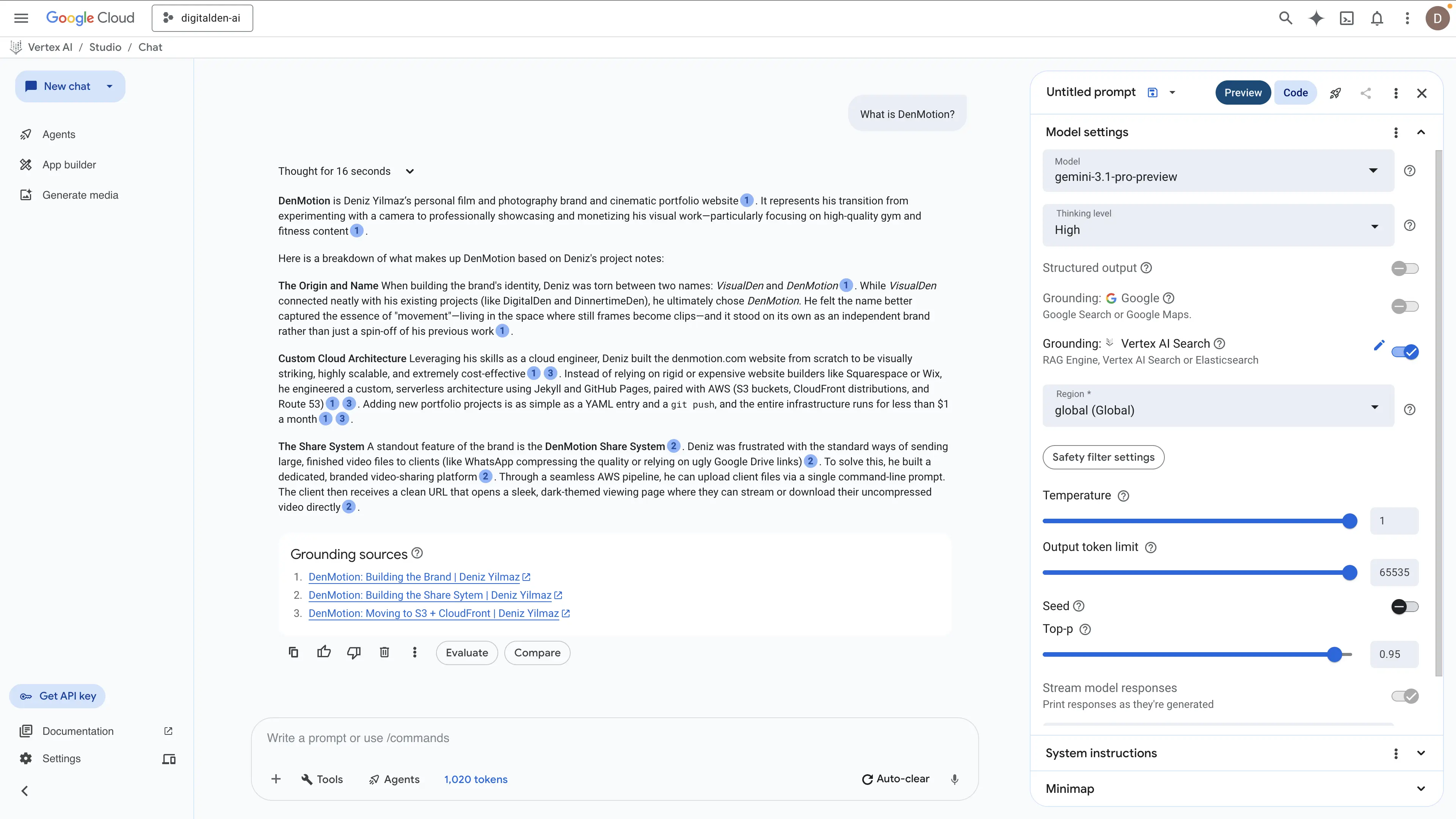
The Vertex AI Search test using Gemini 3.1 Pro Preview and system instructions produced a drastically better result. The engine thought for sixteen seconds and pulled data from three distinct posts. It synthesized this information into a complete architectural and historical breakdown rather than just returning isolated facts. The model accurately extracted the origin story along with the specific AWS serverless infrastructure. It identified the exact use of S3, CloudFront, and Route 53, and it correctly stated the environment costs less than one dollar a month.
However, the most impressive part was its ability to explain the custom share system built to bypass third party file compression. This proves Vertex AI Search can natively connect separate technical concepts into a single functional answer without requiring a custom retrieval pipeline.
“What camera lens does he want to get next?”
RAG Engine (Spanner Basic, no reranking)
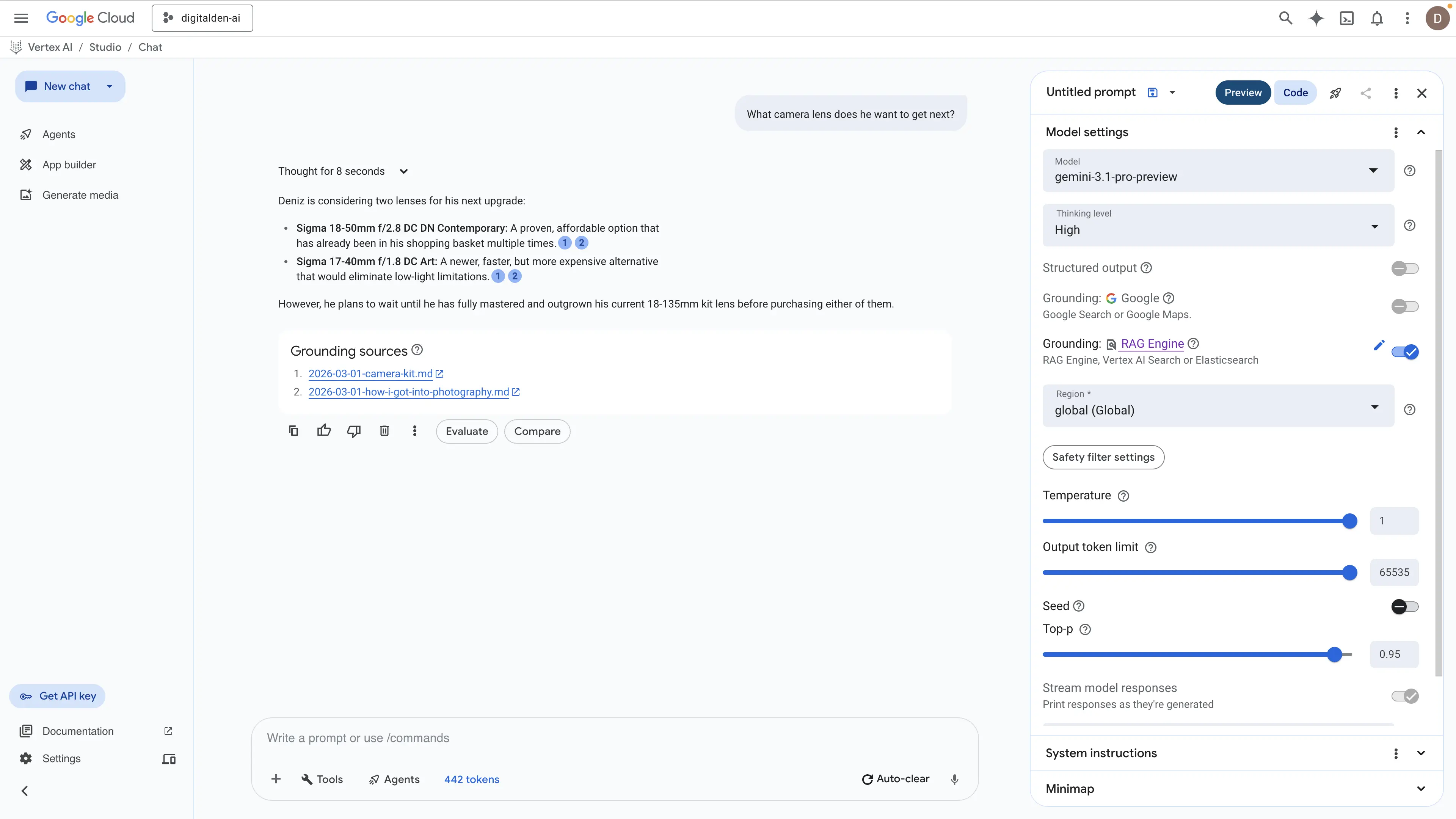
The RAG Engine returned a fast and factually correct answer in eight seconds. It successfully identified the two Sigma lenses and correctly stated the requirement to master the existing kit lens first. However, the response remains entirely surface level. It extracts the raw items but lacks the technical reasoning behind why these specific lenses are required for the camera kit.
Vertex AI Search (Gemini 3.1 Pro Preview, system instructions)
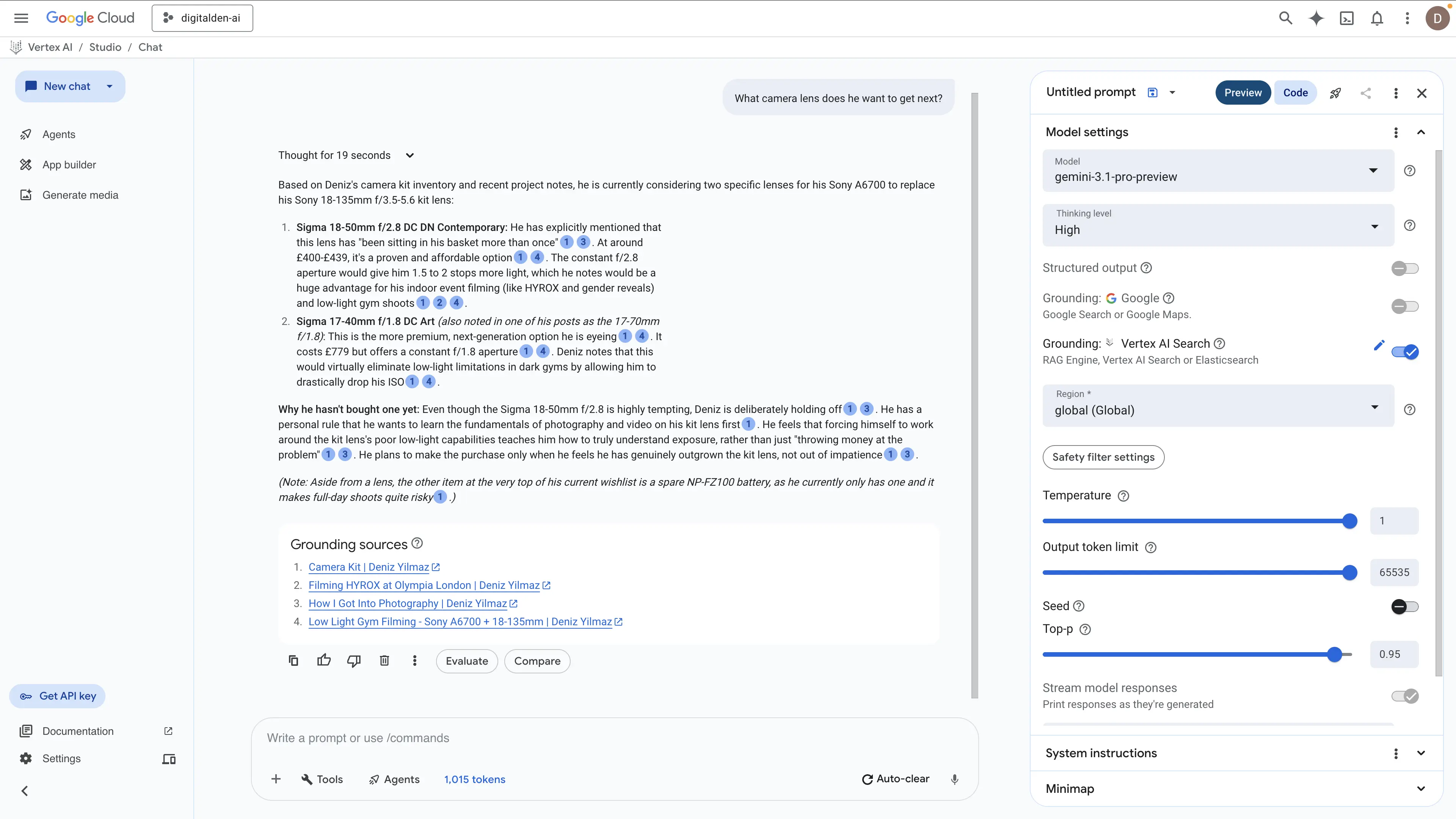
The Vertex AI Search model took nineteen seconds to process the query and delivered a vastly superior technical extraction. It did not just list the hardware. It explained the mechanical reasoning behind the upgrade path. The engine correctly identified the aperture limitations of the current setup and how the constant apertures of the Sigma lenses solve exposure problems for indoor events like HYROX. It also extracted the underlying principle of not throwing money at the problem until the kit lens is genuinely outgrown. Furthermore, the model scraped an additional operational requirement by identifying the critical need for a spare NP-FZ100 battery. This proves Vertex AI Search understands the full context of a hardware configuration rather than just matching basic text strings.
What This Shows
Both methods successfully found the relevant posts. The difference lies entirely in execution. The RAG Engine returned short and strictly factual summaries extracted from the top matching chunks. Vertex AI Search retrieved much deeper context from those exact same documents. It synthesized the data into complete answers that captured the raw facts, the technical reasoning, and the operational mindset behind the architecture choices.
Why Vertex AI Search Beat RAG Engine
I put real effort into RAG Engine. I set up the GCS bucket, uploaded 28 markdown files, tried Serverless mode, hit QPS errors for days, switched to Spanner Basic, dealt with region restrictions that blocked us-central1, and tested every reranking model available. None of them worked reliably.
The frustrating part is that the individual pieces all worked. The files imported in 10 seconds. The corpus created fine. Basic queries returned grounded answers. However, the moment I tried to push it further with reranking, broader queries, or the Serverless backend, it fell apart. Serverless mode is a preview with genuine stability issues. Reranking models either were not available in my project or exhausted quota immediately. These are platform limitations, not configuration mistakes.
I gave RAG Engine my files directly. No crawling, no waiting, no domain verification. And it still produced weaker answers than Vertex AI Search, which had to crawl my public site over 24 hours before it could return anything. The retrieval infrastructure behind Vertex AI Search is just better than a default RAG pipeline with 1,024 token chunks, default parsing, and no working reranker.
RAG Engine gives you more control in theory. You choose the embedding model, the chunk size, the vector database, the parser. In practice, that control came with more friction and worse results than the fully managed option.
The one scenario where RAG Engine becomes the only option is when your data is not on the public web. Internal documents, unpublished drafts, proprietary content. If Google cannot crawl it, Vertex AI Search cannot index it. In that case, RAG Engine is the only path. For public blog posts, Vertex AI Search already has the advantage before you configure anything.
Cost
The infrastructure costs for this project were minimal.
| Component | Cost |
|---|---|
| Vertex AI Search (25 queries, data indexing) | £0.08 |
| RAG Engine grounding (110 prompts) | £0.21 |
| Vector Search 2.0 (storage, reads) | £0.05 |
| Embeddings (1.4M tokens) | £0.03 |
| GCS bucket (28 files, 722 KiB) | £0.00 |
| Google Search grounding (54 prompts) | £0.00 |
| Infrastructure total | £0.37 |
The majority of spend went to Gemini model usage for generating grounded responses. That cost is harder to isolate because I used Vertex AI Studio for other conversations during the same period. Total project spend across 20 days was £59.36, all covered by free credits.
The expensive part is not the search or retrieval infrastructure. It is the language model. Gemini 3.1 Pro Preview input tokens accounted for most of the spend. Grounding inflates input token counts significantly because every query includes the retrieved chunks as context on top of your actual question.
Spanner billing
If you use RAG Engine with Spanner mode, remember to set the tier to Unprovisioned when you are finished. The Spanner instance charges per hour whether you are querying it or not.
Comparison
| Vertex AI Search | RAG Engine (Serverless) | RAG Engine (Spanner) | Google Search Grounding | |
|---|---|---|---|---|
| Setup time | Minutes (then 24hr indexing) | Minutes (10 sec import) | Minutes (10 sec import) | None |
| Control over pipeline | None | Full (chunking, embedding, parser) | Full | None |
| Answer quality | Excellent | Good | Good | Excellent |
| General knowledge follow-ups | Yes (with system instructions) | No (corpus only) | No (corpus only) | Yes |
| Stability | Stable | QPS errors (preview) | Stable | Stable |
| Cost | Per query (low) | Free (broken) | Spanner hourly charge | Per grounded prompt |
| Best for | Public web content | Private documents | Private documents | Public web content with general knowledge |
What I Would Use
For personal use with my public blog posts, Vertex AI Search grounding with Gemini 3.1 Pro Preview and system instructions. It gives grounded personal context from my posts and general knowledge for follow-up questions. No infrastructure to manage, no quota issues, and the answer quality is the best of any method I tested.
For private data that is not on the public web, RAG Engine with Spanner Basic. Avoid Serverless mode until it exits preview and the QPS issues are resolved.
What Comes Next
The AWS equivalent. Same 28 markdown files, same questions, built on Amazon Bedrock Knowledge Bases with a Bedrock Agent that routes between the knowledge base and general model knowledge. The point is a direct cross-cloud comparison of setup experience, answer quality, and cost.
That will be a separate post.
Documented April 2026.